HTML
<div data-appcore-id="app.js.counter-component">
    <button data-action="decrement">-</button>
    <span data-zone="value">0</span>
    <button data-action="increment">+</button>
</div>
JavaScript framework and application generator
A lightweight JavaScript framework focused on layered overrides, code factorization, and interoperability with standard web and Node.js code.
AppCoreJS is a lightweight JavaScript framework and application generator focused on layered overrides, code factorization, and interoperability with standard web and Node.js code.
It generates a working application out of the box, from backend/script projects to full server + frontend applications. The generated structure is designed to be extended, specialized, or overridden instead of rewritten from scratch.
Its architecture separates the framework core, the global application layer, and the project-specific layer. The app layer can override core classes and global behavior once, while each project can still specialize or extend what it needs locally.
AppCoreJS also provides a complete ORM layer that can be generated and regenerated from multi-database, multi-schema projects without losing project-specific specializations.
The framework is organized around a simple rule: the core remains untouched. Application and project code adapt behavior through subclasses, overrides, templates, and static file resolution.
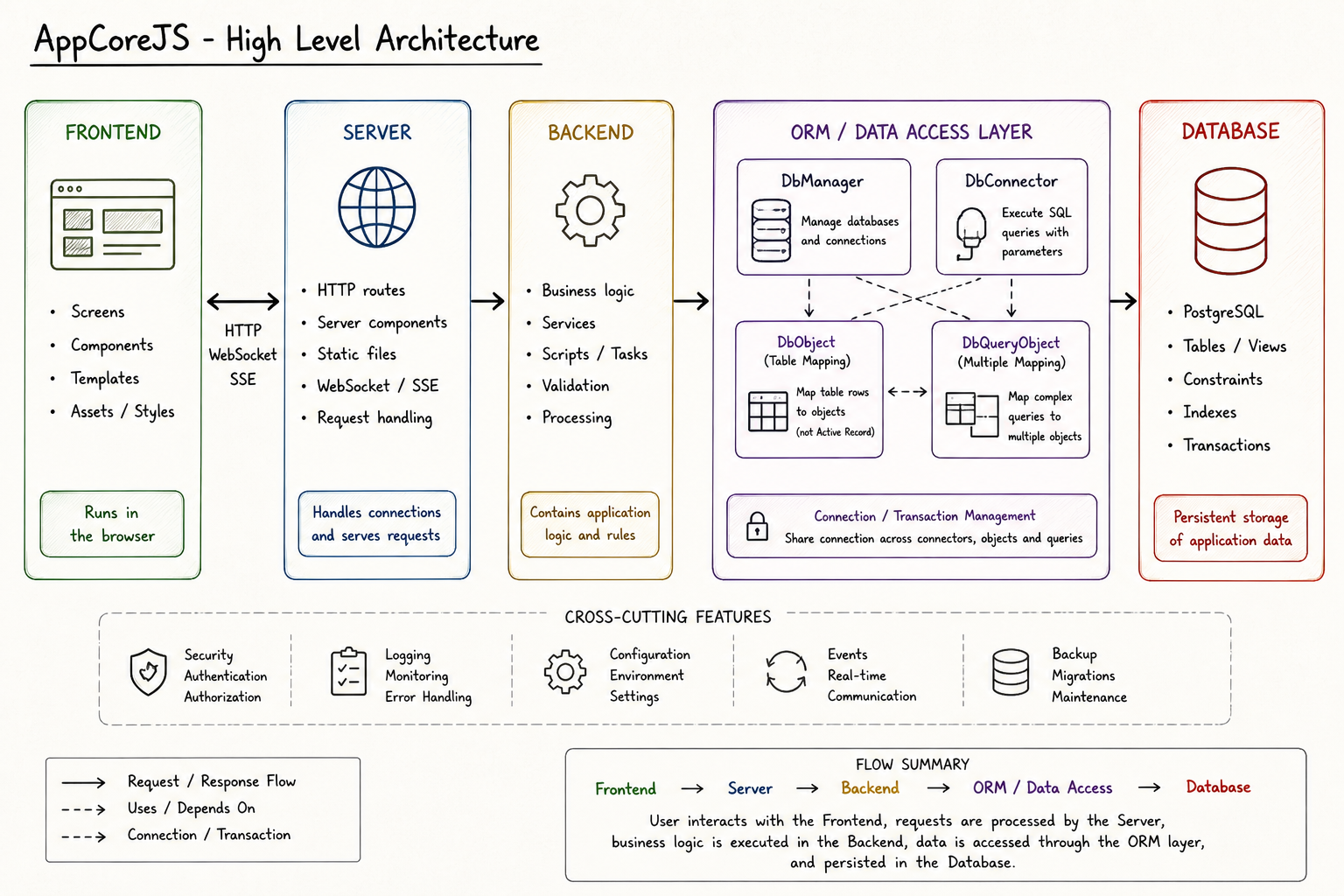
Core, app and project layers are separated on both backend and frontend sides.
The examples below are not an exhaustive feature list. They show some practical sides of AppCoreJS: use standard HTML and JavaScript, keep the generated structure readable, and place project-specific behavior in explicit overrides.
A component can start as plain HTML, then be connected to a JavaScript class. Templates, zones and child components remain regular DOM elements.
<div data-appcore-id="app.js.counter-component">
<button data-action="decrement">-</button>
<span data-zone="value">0</span>
<button data-action="increment">+</button>
</div>import { Component } from "../../app/js/Component.js";
export class CounterComponent extends Component
{
static appcoreClass = "app.js.counter-component";
async onLoad()
{
await super.onLoad();
this.value = 0;
this.find('[data-action="increment"]').onclick =
() => this.setValue(this.value + 1);
this.find('[data-action="decrement"]').onclick =
() => this.setValue(this.value - 1);
}
setValue(value)
{
this.value = value;
this.find('[data-zone="value"]').textContent = value;
}
}
Server features are also provided by components. A project can add its own
server-side behavior without changing the framework core. This example adds a small HTTP component with a GET /ping route returning pong.
import { Server } from "../../app/server/Server.js";
import { PingServerComponent }
    from "./components/PingServerComponent.js";

export class MyProjectServer extends Server
{
    constructor()
    {
        super();

        this.registerServerComponent(
            new PingServerComponent()
        );
    }
}import { ServerComponent }
from "../../../app/server/ServerComponent.js";
export class PingServerComponent extends ServerComponent
{
startHttp()
{
this.server.application.get(
"/ping",
async (request, response) =>
{
response.json({
message: "pong"
});
}
);
}
}Generated ORM classes live in the project structure and can be regenerated. Project-specific rules stay in subclasses, for example to validate a value before saving.
import { CoreRageditorDocument } from "./core/CoreRageditorDocument.js";

export class RageditorDocument extends CoreRageditorDocument
{
    async beforeSave(context)
    {
        await super.beforeSave(context);

        if (!this.name || this.name.trim() === "")
        {
            // Explicit validation error.
            throw new Error("Document name is required");

            // Or simply abort the save.
            // return false;
        }
    }
}const document = new RageditorDocument();
document.name = request.body.name;
document.type = request.body.type;
await document.save();
// The generated base class can change,
// but this project rule stays here.Query objects can define their own SQL base, expose computed values, and hydrate ORM objects from JSON columns. They are then used almost like regular objects: search, move to the next row, read the hydrated object, update it, and save it.
import { DbQueryObject }
    from "../../../app/db/DbQueryObject.js";
import { RageditorDocument }
    from "../models/RageditorDocument.js";

export class DbQueryDocument extends DbQueryObject
{
    constructor(connectionUid = "default")
    {
        super("rageditor", connectionUid);

        this._query = `
            SELECT
                document.*,
                to_jsonb(document) AS document,
                COUNT(document_chunk.uid) AS chunk_count
            FROM document
            LEFT JOIN document_chunk
                ON document_chunk.document_uid = document.uid
            GROUP BY document.uid
        `;

        this.addDbObject(
            RageditorDocument,
            "document",
            "document"
        );
    }
}const query = new DbQueryDocument();
await query.search(
"document.name ILIKE $1",
["%" + request.body.name + "%"]
);
while (await query.next())
{
console.log(query.chunk_count);
console.log(query.document.name);
query.document.name = "Updated name";
await query.document.save();
}
// The hydrated object also has its own cursor.
if (await query.document.next())
{
query.document.name = "Another update";
await query.document.save();
}Core classes stay stable while app and project layers override only what they need.
Projects start as a minimal working application that can be improved, augmented, and specialized over time.
Database models can be generated again without replacing project-specific extensions.